Raise the PO from the job you just won
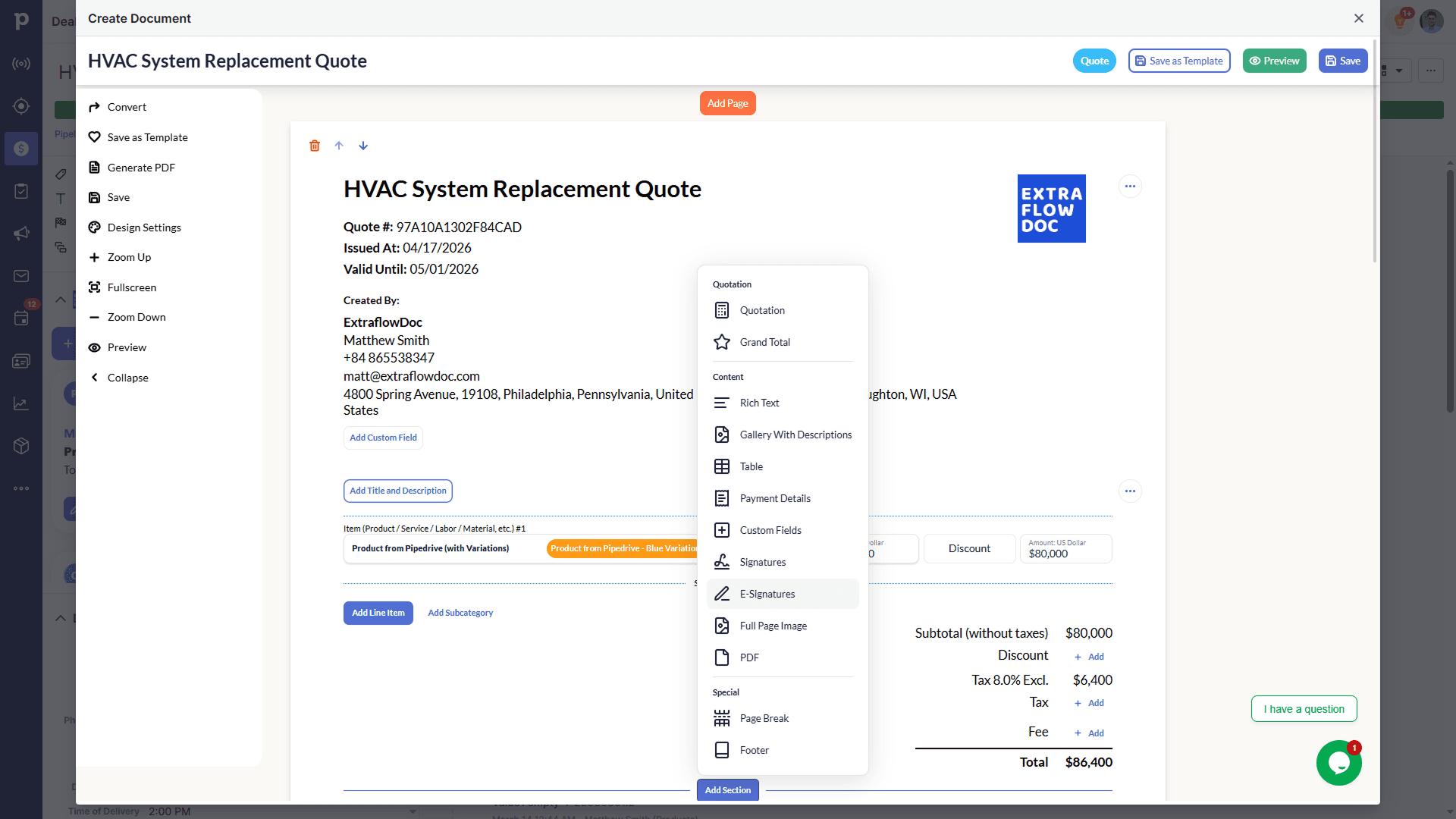
The deal is already in your CRM with the client, the scope and the priced line items. Open ExtraflowDoc on it and build the supplier PO from the same record instead of starting a fresh document somewhere else.

Purchase order software
You quoted the work, you won it, now you have to buy the materials. ExtraflowDoc raises the supplier order from the same CRM record and the same catalog the quote was priced from — itemized, calculated, and filed against the job it belongs to.
Free plan available. No credit card required. Or raise a purchase order right now with no sign-up.
The ExtraflowDoc document editor
Features
The supplier needs to know exactly what you want, at what price, by when — and you need it to agree with what you quoted the customer.
The deal is already in your CRM with the client, the scope and the priced line items. Open ExtraflowDoc on it and build the supplier PO from the same record instead of starting a fresh document somewhere else.
Search your product catalog and drop items onto the order with their price, variations and images attached — the same catalog the quote was priced from, so the numbers agree.
Enter quantities and unit prices and let the subtotal, tax and grand total calculate themselves. No spreadsheet arithmetic, and no PO that quietly disagrees with the quote it came from.
Ordering plant or equipment by the day? Add a calculated column for price × quantity × days, so hire POs price correctly without a manual sum at the bottom.
Save a completed order as a template — supplier details, standard terms, usual line items — so the next PO to that merchant takes a minute rather than a rebuild.
Export a clean PDF to email your supplier, or share a secure link they can open in a browser. Every order carries its own reference so it can be quoted back to you.
Send the order for signature and get a recorded acceptance with a full audit trail — useful when the supplier's confirmation is the thing that pins down price and delivery date.
The same editor produces the delivery note that travels with the goods and the work order that sends your crew out, so the paperwork around a job doesn't live in three different tools.
ExtraflowDoc opens in the deal or board your team already works in, so the supplier order sits with the job it belongs to rather than in someone's downloads folder.
Where ExtraflowDoc fits
Most software on this search is a procure-to-pay platform. ExtraflowDoc is not one, and it's more useful to say so than to imply otherwise — so here is the boundary.
If you need approval chains and spend control across a company, buy a procurement platform. If you need to send suppliers an accurate order for work you've won, without implementing anything, that's this.
Solution
The purchase order is one document in a family. The quote that won the job, the order that buys the materials, the delivery note that travels with them and the invoice that closes it all come out of one editor, off one catalog.
Integrations
ExtraflowDoc installs into Pipedrive and monday.com and opens inside the record you're working on — no export, no copy-paste, no extra tab.
Open ExtraflowDoc from the deal you won and raise the supplier order against it, with contact, product and pricing data already in place.

Raise purchase orders straight from a monday.com board, with supplier and item data mapped in from your existing columns and the order stored back on the item.
Document examples
Quotes, estimates and equipment orders built by ExtraflowDoc customers — click any example to view it full-screen, page by page.
3D Printing Quote Template: SLS, FDM and SLA Parts
A 3-page 3D printing quote: three parts in SLS, FDM and SLA with material, volume and finish, inserts, price breaks, tolerances and terms.View full exampleWatch the demo
By industry
What you order, and how many suppliers you order it from, changes completely by trade. Here's what ExtraflowDoc does for the way different businesses actually buy.
One job, several merchants: timber to one, groundworks plant to another, fixings to a third. Raise a separate order per supplier off the same won deal, each priced from the same take-off.
Order subcontract packages with the scope written out, not just a sum, so what you asked for and what you agreed to pay are recorded on one document you can point at later.
Order the unit, the ductwork and the controls against the job you've already specified, with model numbers and quantities carried across from the quote rather than retyped.
Order cable by the drum, boards by the schedule and accessories by the box, with quantities that match the design and a reference the wholesaler can quote back at delivery.
Raise the merchant order from the van once the job is won, with the boiler, fittings and sundries itemized and a delivery date you can hold the supplier to.
Order tiles, membrane and battens by the measured area, and keep the supplier order filed against the same job as the signed customer quote.
Plants from the nursery, aggregate by the tonne and hire plant by the day — three orders, three suppliers, one job, priced with calculated columns where a day rate applies.
Order sheet materials, ironmongery and finishes to the cutting list, with a template per regular supplier so repeat orders take a minute.
Order raw stock and bought-in components against a production job, with unit prices and quantities that reconcile to what you quoted the customer.
Order bar stock, tooling and outsourced finishing per part run, keeping the supplier price visible next to the margin you quoted on.
Hire in what you don't own with a calculated column for price × quantity × days, so a two-week excavator hire prices itself instead of being worked out on a notepad.
Order food, drink, staffing and kit for a specific booking, with separate orders per supplier and a delivery note that travels with the goods on the day.
Order substrate, vinyl and outsourced finishing per run, with volume breaks reflected in the unit price rather than applied by memory.
Order hardware and licences from your distributor against the customer order you've already won, with part numbers and quantities carried through.
Send a supplier a proper, itemized order instead of a text message — from a free plan, with no procurement system to implement and nobody to train.
Free tools
Need to send one order today rather than roll something out? Build it in the browser and download the PDF. Nothing to install, nothing to cancel.
Raise an accurate purchase order to a supplier with quantities, unit prices and totals that match — free, in your browser.
Create Purchase OrderBuild an itemized sales quote with live pricing, discounts, and a clear total your client can say yes to.
Create QuoteGive clients a line-by-line cost estimate for materials and labor before the work starts.
Create EstimateBill the job once it's done, with itemized lines, tax, and totals that add themselves up.
Create InvoiceTurn scope, pricing, and terms into a polished proposal that's ready to send and sign.
Create ProposalPricing
Every plan includes unlimited users and every document type. Start free — upgrade only when you need more documents a month.
USD $0/month
Get started with the Free plan5 documents/month per company
USD $14.99/month
Get started with the Basic plan20 documents/month per company
USD $24.99/month
Get started with the Standard plan35 documents/month per company
Customer stories
“Game changer for our construction business. Complex estimates that used to take hours now take 10 minutes.”
“Best ROI of any software we've purchased. Paid for itself in the first week.”
“Very intuitive. Our team was creating professional proposals on day one with zero training.”
“ExtraflowDoc saved us hours every week. We send professional cleaning quotes in minutes instead of hours.”
“The Pipedrive integration is seamless. All our client data auto-fills perfectly.”
“ExtraflowDoc has been an outstanding addition to our workflow in Pipedrive. The app works seamlessly with Pipedrive, making document generation and automation incredibly smooth and easy to use. What really stands out is how much time it saves our team every single day. Honestly, the app quickly pays for itself just through its efficiency. If you use Pipedrive and want to streamline your document process, improve efficiency, and save valuable time, I highly recommend ExtraflowDoc.”
FAQ
What a purchase order should contain, what ExtraflowDoc does, and what it doesn't.
Purchase order software is a tool for raising the document you send a supplier to order goods or services at an agreed price. At minimum it should itemize what you're ordering, calculate the totals, carry your details and the supplier's, and produce something you can send and refer back to. ExtraflowDoc does that inside the CRM where the job already lives, so the order sits with the work it was bought for.
A PO number you can both quote, your details and the supplier's, the delivery address and date, and a line for each item with quantity, unit price and line total — then subtotal, tax and grand total, plus any terms you're relying on. ExtraflowDoc builds all of that from blocks and calculates the figures as you type.
A purchase order is raised by the buyer to order goods or services at an agreed price. An invoice is issued by the seller to request payment once those goods or services have been delivered. The PO comes first and sets the terms; the invoice follows and should match it.
A quote is what you send a customer to win work: a firm price they can accept. A purchase order is what you send a supplier to buy the materials for that work. Most businesses need both, which is why ExtraflowDoc produces them from the same editor and the same catalog.
You raise it from the same deal, reusing the same catalog items, so the supplier order and the customer quote are priced off one source. To be precise about what's automatic: ExtraflowDoc converts a won quote into an invoice in one click. A purchase order is a new document you build on the same record — fast, because the data and the catalog are already there, but not a one-click conversion.
Yes. ExtraflowDoc has a free plan covering 5 documents a month per company with unlimited users, plus a free browser purchase order generator that needs no sign-up at all. Paid plans start at USD $14.99/month when you outgrow the free quota.
Procurement platforms are typically priced per user per month and sold with an implementation. ExtraflowDoc charges per company by document volume instead: free for 5 documents a month, USD $14.99/month for 20, up to 600 a month — with unlimited users on every plan.
No. There are no multi-level approvals, spend thresholds or routing rules — nothing holds an order until a manager signs it off. If approval routing is the reason you're looking, you need a procurement platform such as Precoro or Procurify, not ExtraflowDoc.
No. ExtraflowDoc has no requisition step: there's no internal request that gets raised, reviewed and then converted into an order. You create the purchase order directly, which suits teams where the person buying is the person authorized to buy.
No, and it's worth being blunt about it. Procure-to-pay covers requisition, approval, ordering, receiving, invoice matching and payment as one chain. ExtraflowDoc covers the ordering document only. It's the right tool if you want to send suppliers a proper order tied to a job; it's the wrong tool if you want control over company-wide spend.
No. ExtraflowDoc doesn't record deliveries against an order or match a PO to a goods receipt and a supplier invoice. It produces a delivery note as a document, but reconciling what arrived against what was ordered and billed is a job for an accounting or procurement system.
No. There are no budgets, committed-spend tracking, overspend alerts or spend dashboards. ExtraflowDoc reports on the documents you've created, not on where your company's money is going.
Partly, and the distinction matters. If you mean creating orders from templates, keeping them with the job, tracking their status and reusing content across them, then yes. If you mean managing a procurement function — requisitions, approval chains, supplier onboarding and budget oversight — then no.
You can follow each document's status as it moves from created to sent to signed, and find every order filed against the deal it belongs to. That's document tracking, not delivery tracking: ExtraflowDoc won't tell you where the van is or what's been received.
Yes. Send the purchase order for signature and collect a recorded acceptance with a full audit trail, without a separate e-signature subscription. That's often the point at which price and delivery date actually become firm.
Not as a supplier database. You can save a supplier's details in a template so repeat orders fill themselves in, but there's no vendor onboarding, no approved-supplier list, no supplier portal and no PunchOut catalog.
Not directly. ExtraflowDoc integrates natively with Pipedrive and monday.com and produces PDFs you can attach to your accounting workflow. If you need purchase orders to post straight into your ledger, your accounting package's own PO module will fit better.
Open-source options exist, and they can work if you have the engineering time to host, secure, update and support them. ExtraflowDoc is not open source — it's a hosted product with a free plan, so you get the zero-licence-cost starting point without running a server yourself.
This is the case ExtraflowDoc fits best. One build usually means several suppliers — timber, groundworks plant, fixings — so you raise a separate order per merchant against the same won job, each priced from the same take-off, with the signed customer quote filed alongside them.
That's the intended user. A two-person firm needs a supplier order that looks professional and adds up, not a procurement implementation. The free plan covers 5 documents a month, plans are month-to-month, and every plan includes unlimited users.
Yes. Tax is applied per line item, so mixed-rate orders work, and you pick the currency and number format your supplier invoices in. ExtraflowDoc is localized into 30 languages, so an order reads correctly in your supplier's market as well as yours.
Yes to both. ExtraflowDoc is cloud-based and runs in any modern browser — macOS, Windows, iPad or Android — with nothing to install beyond the Pipedrive or monday.com app itself.
Minutes, not a project. Install the app in Pipedrive or monday.com, open a deal and start a purchase order. Building your first supplier template takes an afternoon at most, and there's no onboarding call to schedule.
Yes, in two ways. Use the free browser purchase order generator with no account at all, or install ExtraflowDoc in your CRM and stay on the free plan — no credit card, no trial clock, no contract.
Ready to order against the job?