
Add a content block
For construction & builders
Construction quoting software for builders and contractors
ExtraflowDoc is quoting software built for the way a build is actually costed: labor, materials, plant, and every subcontractor package on its own line, each with its own markup or target margin, grouped into phases your client can approve — then signed on site before you leave.
- Estimates
- Quotes
- Proposals
- Agreements
- Work orders
- Purchase orders
- Delivery notes
- Invoices
Free plan available. No credit card required. Or price a job in your browser with no account at all.
Free plan, no credit cardWorks on site from a phoneE-signatures included
See it in action
What's Inside ExtraflowDoc?
Explore 15 screenshots for a better understanding — click any screenshot to view it full-screen.
Cover page and quotation block
Line item with a product photo
Line items and the block picker
Warranty section and running totals
Photo gallery with numbered callouts
PDF preview — cover page
PDF preview — quotation
PDF preview — line items and totals
PDF preview — signature block
Cover, quotation, and line items
Scope, terms, and signatures
ExtraflowDoc inside a Pipedrive deal
Start from a document or a template
Quotation block settings
Built for how you cost a job
What a build quote has to get right
Generic quoting tools assume a product with a price. Construction assumes a scope with a cost, and the difference shows up in six places.
Labor, materials, plant and subs on their own lines
A build isn't costed as one number, so it shouldn't be quoted as one. Put day labor, supplied materials, hired plant, and each subcontractor package on separate line items, and set the markup per line — materials at one percentage, subcontracted work at another, your own crew at a day rate.
Margin per line, not one blanket percentage
Price a line directly, from cost plus markup, or backwards from a target profit margin. Mixing all three in one quote is normal on a build: timber at cost-plus, the electrical package at the sub's price plus a handling margin, supervision at a flat weekly figure.
A pricing table per phase or per option
Strip-out, groundworks, first fix, second fix, finishes — each as its own pricing table with its own subtotal, so the client reads the quote the way the job will actually run. Two tables side by side also cover a standard and an upgraded specification without writing a second quote.
Quantities that do their own arithmetic
Add a calculated column for the formulas a flat per-unit rate can't hold: area × rate for screed or render, crew × days × day rate for labor, weeks × weekly charge for scaffold hire. Change the area and every dependent total follows, tax included.
Site photos in the same document as the price
Cover pages and photo gallery blocks put the existing roof, the cracked slab, or last month's finished job beside the figure they justify. One PDF carries the scope of work, the photographs, the price, and the terms instead of three attachments and an email.
Signed on site, then billed from the same lines
It runs in a browser on a phone or tablet, so a quote can go for signature from the driveway with email verification and a timestamped audit trail. Once it's won, convert it to an invoice in one click and raise supplier purchase orders from the same line items.
Worked example
Anatomy of a real roof replacement quote
This is an actual four-page ExtraflowDoc quote for a residential re-roof, and it is worth walking through, because the structure holds whether the job is a roof, a slab, or a full refurbishment.
Page 1 — who, where, and which version
Company and client details, a quote number, and the issue and validity dates. On a build the validity date earns its place: material prices move, and a quote that says how long the figure stands is the one you can defend six weeks later when the client finally signs. The property itself is captured as custom fields — roof type, total area, pitch, and the condition of the existing covering — so the assumptions behind the price sit on the document rather than in a phone call nobody minuted.
Page 2 — the itemized price
The pricing table is where a construction quote either earns trust or invites haggling. Tear-off and disposal, the covering materials, flashings and fittings, the crew's labor, and the permit each appear as their own line with a quantity, a unit price, and a line total. Materials can sit at cost plus markup while labor sits at a day rate and the permit passes through at cost — subtotal, tax, and total recalculate as any of it changes. A homeowner comparing three quotes can see what your number is made of; the one who sent a single lump sum cannot explain theirs.
Pages 3 and 4 — terms, then signature
The payment schedule, the warranty on workmanship and materials, and the cancellation policy are spelled out ahead of the signature block, and the signature block is part of the same document. Nothing is printed, scanned, or emailed separately, and the signed PDF carries the scope, the price, and the terms together — which is exactly what you want to be holding if the scope is disputed later.
Construction document examples
Quotes and estimates from real building jobs
Four documents built with ExtraflowDoc across roofing, remodeling, flooring, and mechanical work — click any example to view it full-screen.
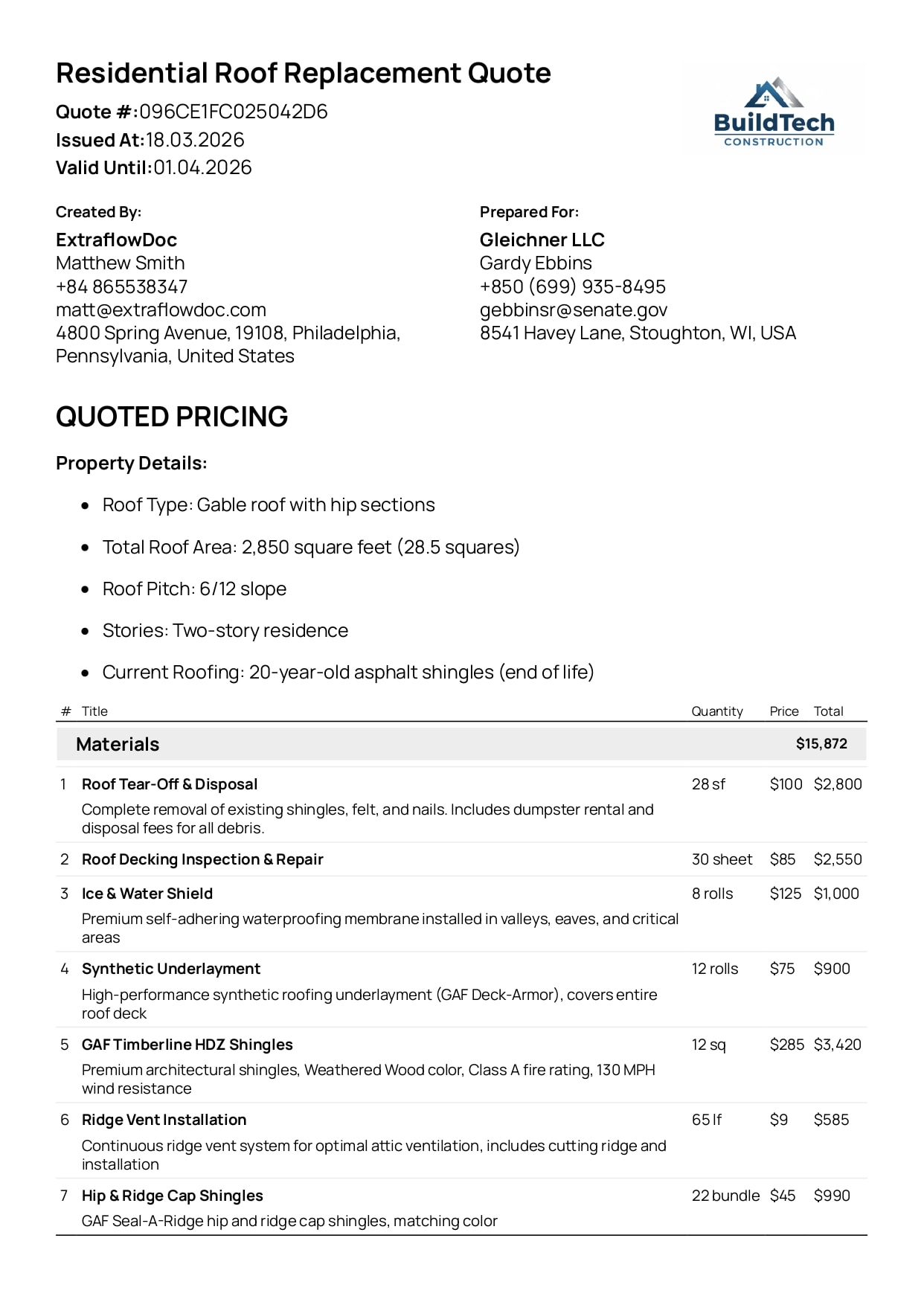
Residential Roof Replacement Quote Example
Tear-off, materials, labor, permits, and totals — itemized for both the crew and the homeowner.
View Residential Roof Replacement Quote example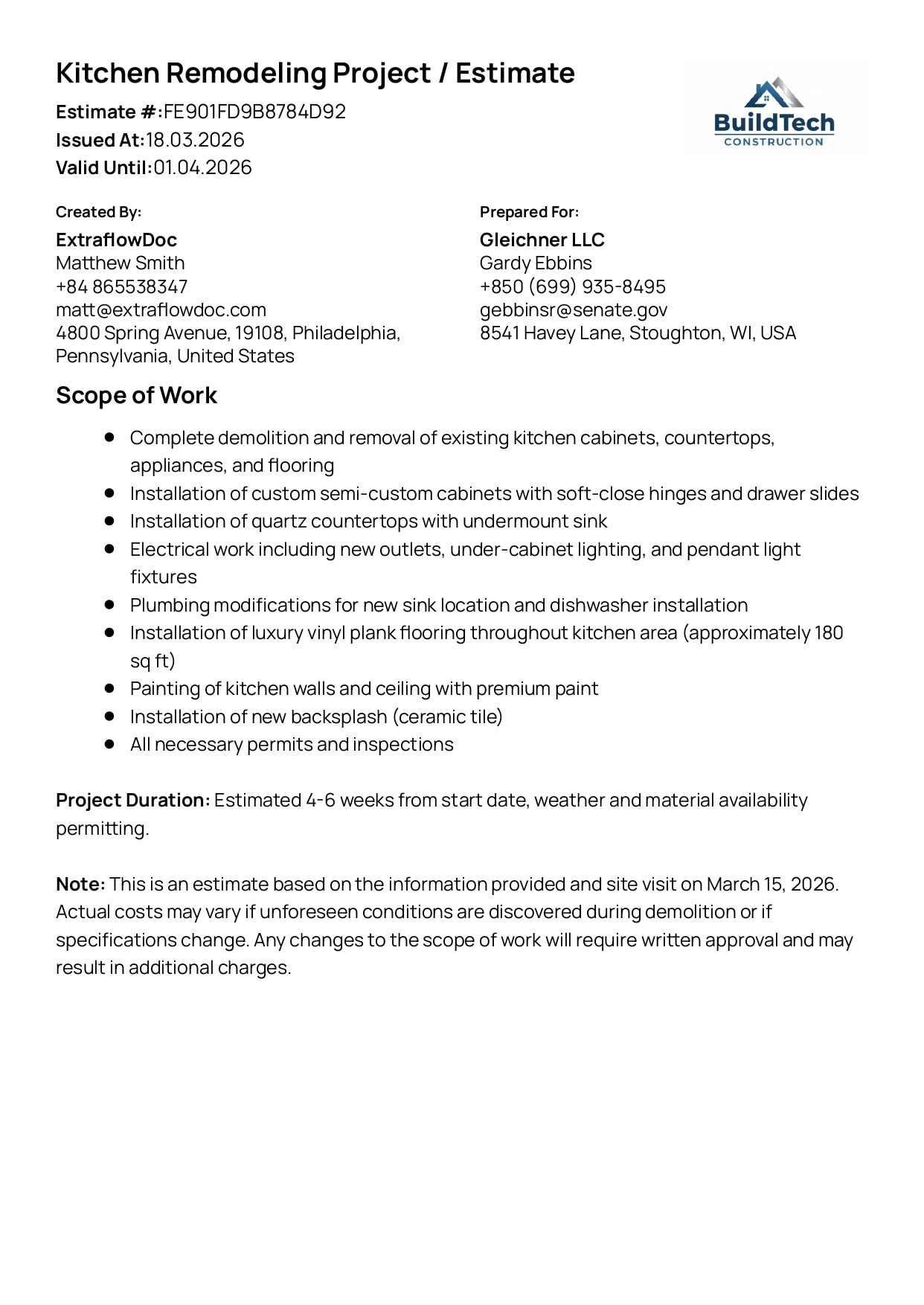
Kitchen Remodeling Project Estimate Example
A multi-trade remodel broken into transparent costs and phases the client can follow.
View Kitchen Remodeling Project Estimate example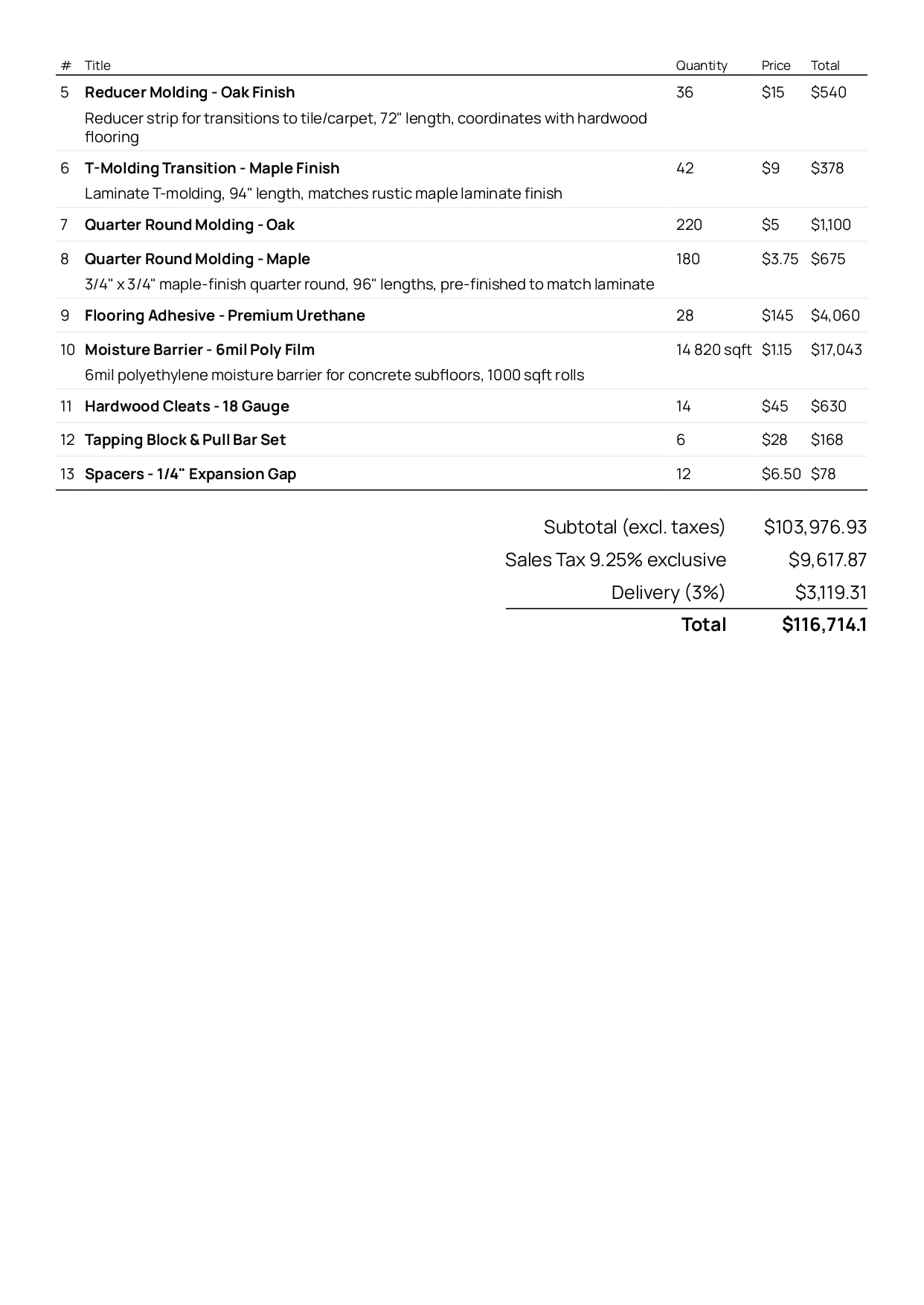
Flooring Materials Estimate Example
Materials priced by area, with fitting shown on its own line rather than buried in the rate.
View Flooring Materials Estimate example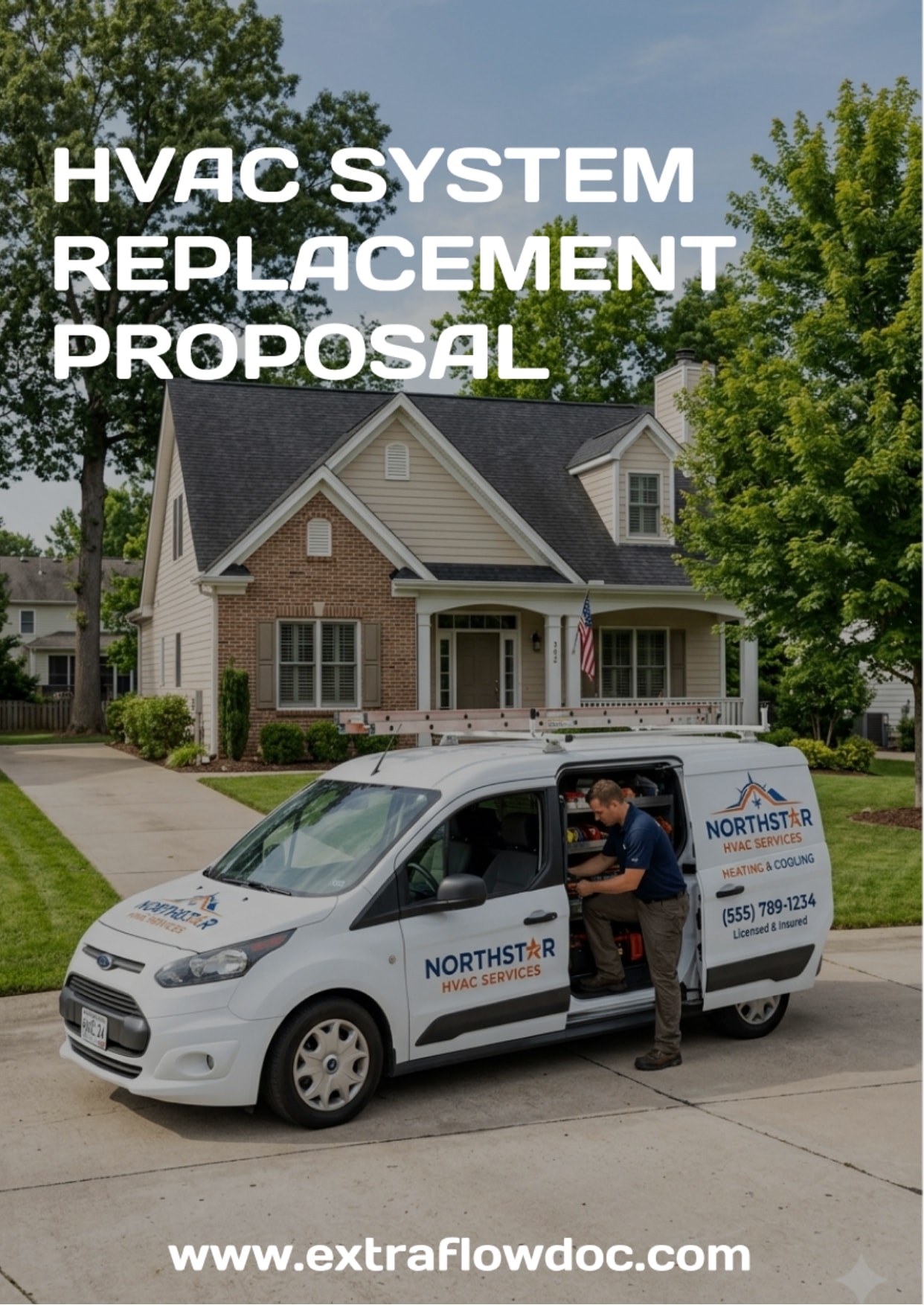
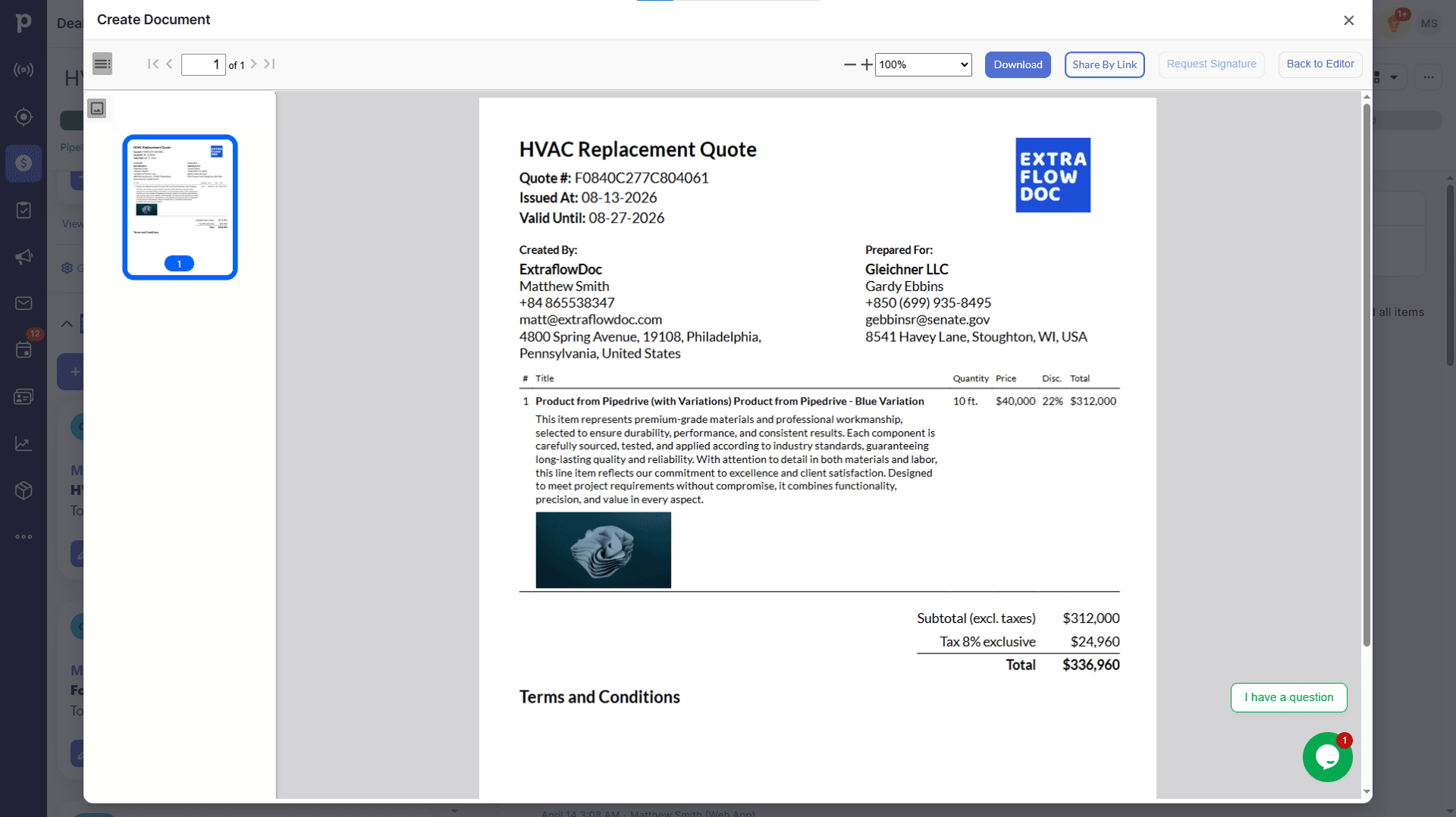
HVAC System Replacement Proposal Example
Equipment, installation, and commissioning quoted as one package with a scope section.
View HVAC System Replacement Proposal exampleSee the transformation
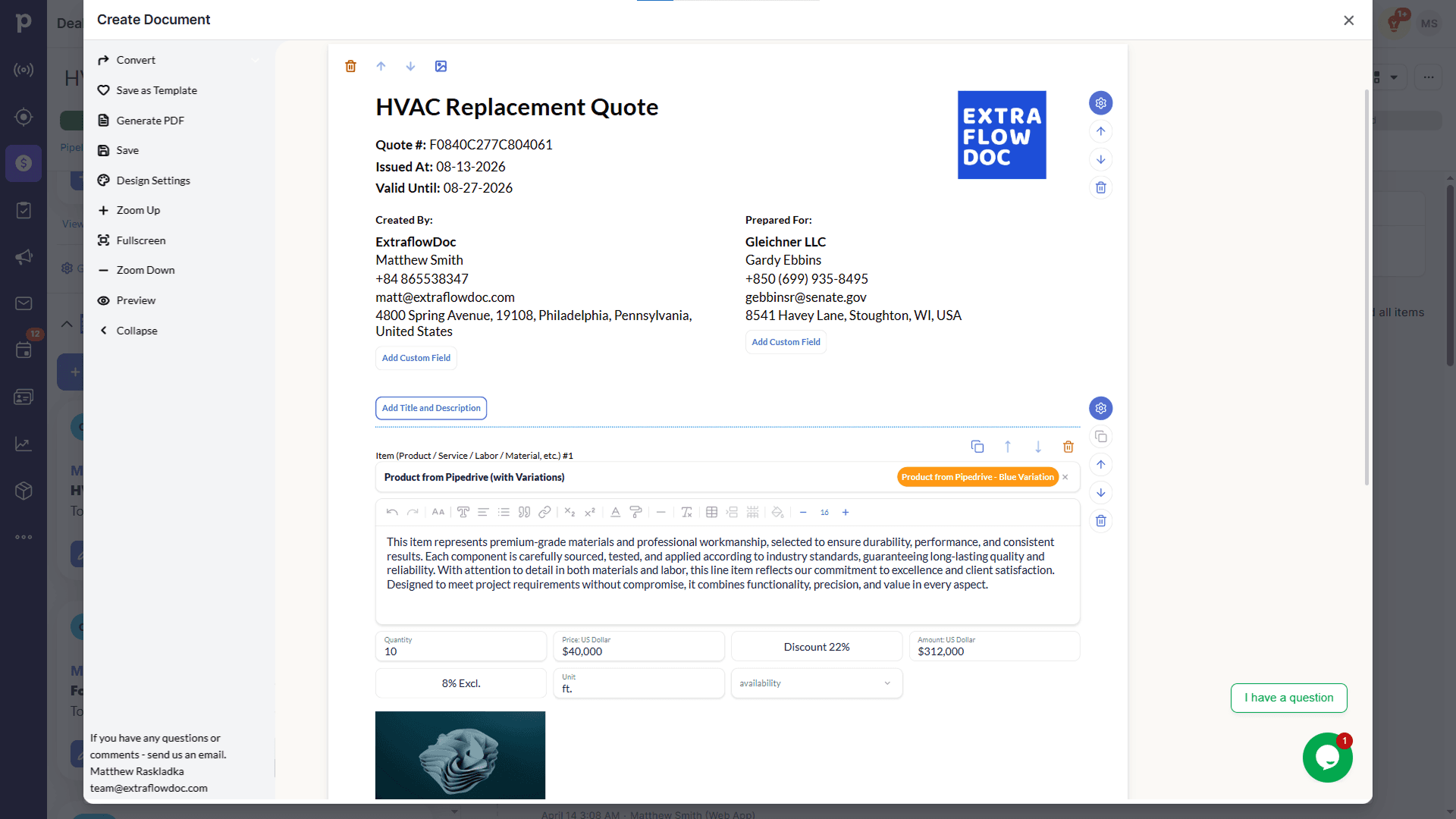
What you build in the editor is what the client receives
Blocks, line items, and markup on the left; the print-ready PDF that lands in the client's inbox on the right. Drag the handle to compare.
Customer stories
From contractors who quote buildings, not widgets
“Game changer for our construction business. Complex estimates that used to take hours now take 10 minutes.”

“Best ROI of any software we've purchased. Paid for itself in the first week.”

“Very intuitive. Our team was creating professional proposals on day one with zero training.”

Integrations
Quote from the job record you already keep
ExtraflowDoc installs into Pipedrive and monday.com and opens inside the deal or board item — so the quote is built where the enquiry, the site visit, and the photographs already live.

Construction quoting in Pipedrive
Open ExtraflowDoc from the deal you already track the job in. Client, site address, and any custom field you map — plot number, roof area, storey count — flow into the quote, and the signed PDF stays attached to the deal.

Construction quoting in monday.com
If your jobs live on a monday.com board, quote straight from the item. Columns you already maintain map into the document, and the finished quote is stored back on the job rather than in someone's downloads folder.
Pricing
Per company, so the whole site team can use it
Estimators, site managers, and the office are all on the same plan at no extra cost — ExtraflowDoc charges by document volume per company, not per seat. Start free and upgrade when the job list grows.
Free plan
USD $0/month
5 documents/month per company
- Estimates
- Quotes
- Proposals
- Invoices
- Agreements
- Purchase Orders
- Delivery Notes
- Work Orders
- Custom Documents
- Templates
- Integration with Pipedrive
- Integration with monday.com
- E-Signatures
- CPQ
- Tiered Pricing
- Volume Discounts
- Multiple Taxes
- Pricing Engine for line items (Price, Price + Markup, Price + Profit Margin)
Basic plan
USD $14.99/month
20 documents/month per company
- Estimates
- Quotes
- Proposals
- Invoices
- Agreements
- Purchase Orders
- Delivery Notes
- Work Orders
- Custom Documents
- Templates
- Integration with Pipedrive
- Integration with monday.com
- E-Signatures
- CPQ
- Tiered Pricing
- Volume Discounts
- Multiple Taxes
- Pricing Engine for line items (Price, Price + Markup, Price + Profit Margin)
Standard plan
USD $24.99/month
35 documents/month per company
- Estimates
- Quotes
- Proposals
- Invoices
- Agreements
- Purchase Orders
- Delivery Notes
- Work Orders
- Custom Documents
- Templates
- Integration with Pipedrive
- Integration with monday.com
- E-Signatures
- CPQ
- Tiered Pricing
- Volume Discounts
- Multiple Taxes
- Pricing Engine for line items (Price, Price + Markup, Price + Profit Margin)
FAQ
Construction quoting software: frequently asked questions
Including the things ExtraflowDoc does not do, so you find out now rather than later.
What is construction quoting software?
It's software that turns a costed job into a priced document a client can accept: line items for labor, materials, plant, and subcontractor packages, a markup or margin applied where you want it, and a professional PDF with your scope of work and terms attached. ExtraflowDoc does that from the deal you already track the job in, so the quote starts from real client and site data rather than last month's Word file.
Can I quote labor and materials separately?
That's the normal way to build a quote in ExtraflowDoc. Every line item is priced on its own, so supplied materials, your crew's labor, hired plant, and each subcontractor package sit on separate lines with their own quantity, unit price, tax, and markup. The client sees an itemized breakdown; you see where the margin actually is.
How do I add markup to subcontractor costs?
Enter the sub's price as the line cost and price that line from cost plus markup, or from a target profit margin if you would rather work backwards from the percentage you need to hold. Each line carries its own figure, so a 10% handling margin on the electrical package and 22% on materials live happily in the same quote.
Does ExtraflowDoc do takeoff or estimating from drawings?
No. ExtraflowDoc is not takeoff or measurement software — it won't read a PDF drawing, scale it, or count fittings off a plan. It takes over once the quantities are known: pricing them, applying markup and margin, producing the client-facing document, and collecting the signature. Builders typically keep their takeoff tool or spreadsheet for measurement and use ExtraflowDoc for everything after it.
Can I show the job in phases the client approves section by section?
Yes. Use a separate pricing table per phase — strip-out, groundworks, first fix, second fix, finishes — each with its own subtotal, and lay two tables side by side when you're quoting a standard and an upgraded specification. The client reads the quote in the order the job will run instead of scanning one long list.
Can it price by area, by crew day, or by week on hire?
Yes, with calculated columns. Add a formula column for area × rate, crew × days × day rate, or weeks × weekly hire charge, and the totals recalculate when the input changes. That covers the pricing a flat per-unit rate can't hold — screed and render by the square metre, supervision by the week, scaffold by the hire period.
Can I send a quote and get it signed on site?
Yes. ExtraflowDoc runs in a browser on a phone or tablet with nothing to install, so you can finish the quote in the van, share a secure link or a PDF, and request the signature before you leave. Signatures come with email verification, a timestamp, and an audit trail, and the status updates in real time as the client opens and signs.
What happens when the scope changes after the client has signed?
The signed document stays as it is — that's the point of it. For extra work you issue a new priced document against the same job and keep both on the record, so the original scope, the agreed figure, and everything added afterwards are all evidenced. ExtraflowDoc has no automated change-order workflow that revises a signed quote in place; it keeps a document trail instead.
Can I set out a staged payment schedule?
You can state the schedule in the document — a payment details block and a terms section spell out the deposit, the stage payments, and any retention before the client signs. ExtraflowDoc doesn't collect the money or raise the stage invoices for you automatically: when a stage completes you create the invoice from the same line items, which takes a click from a won quote.
Can I raise purchase orders to my suppliers from the quote?
Yes. Purchase orders, work orders, and delivery notes are document types in the same editor as the quote, so the materials you have just quoted can go out to the merchant without being retyped, and the numbers on the order match the numbers the client approved.
Does it integrate with QuickBooks, Xero, or my accounting package?
Not directly. ExtraflowDoc's native integrations are Pipedrive and monday.com; it produces PDFs you attach to your accounting workflow. If your quotes and invoices have to originate inside your accounting package, ExtraflowDoc isn't the right fit today — worth knowing before you install it rather than after.
Is there free quoting software for builders and contractors?
ExtraflowDoc's free plan covers 5 documents a month per company with unlimited users — enough for a one- or two-person outfit quoting a handful of jobs. Paid plans start at USD $14.99/month for 20 documents, and because billing is per company rather than per seat, putting every estimator and site manager on it doesn't change the price.
Ready to quote the next job?